Google assigns a place ID to every business. We want to get that information first. You don't need to be logged into Google to do this.
Click this link: Google Place ID Finder
This is the actual link >> https://developers.google.com/places/place-id.
That will get you to a page with this graphic.
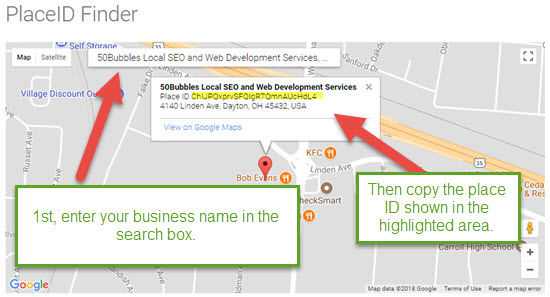
Once you have your PlaceID, here is the link you want to create:
CREATING YOUR GOOGLE REVIEW LINK
This is the context of the link: https://search.google.com/local/writereview?placeid=[paste your place id here]
In my case it would look like this: https://search.google.com/local/writereview?placeid=ChIJPQxprvSFQIgR7QmnAUcHdL4 (make sure you EXCLUDE the brackets. THAT'S IT!
What can you do with this link?
VERBAL LINK:
Create a forwarding domain for the link so it's easy to remember: I purchased a domain on Godaddy and forward to the link I created above. Whenever I verbally ask for a review it is simply: Please goto: www.50bubblesreview.com.
BUSINESS CARDS
I like the idea of putting a QRCode on the back of a business card. Since most people have their phone with them, all they have to do is point the phone QR Code reader (you can find a QR code reader free on Google Play or IOS Apps Store on your phone). To create the code, you can head over to https://www.qrstuff.com and create a QRCode. This is a handy addition to the back of your business cards! Go ahead! If you have a QR Code Reader on your phone... point it at this.
EMAIL SIGNATURE
Adding: Review Us On Google to your email signature is a very soft request for people who don't like to overtly ask. My email signature looks like this:
Regards,
Greg Newell
50Bubbles, LLC
SEO and Digital Marketing Solutions - Dayton Ohio
PH: 937-471-MAPS (6277)
CELL: 614-214-6645
Please Review Us On Google